
Edit Post („Modify caption and details”) pozwala dopasować tekst i szczegóły wyświetlane przy poście. Dzięki temu treść w widżecie wygląda tak, jak chcesz, a nie tak, jak trafiła ze źródła.
Jak edytować post
- Open the post’s menu. Kliknij menu akcji z trzema kropkami przy poście.
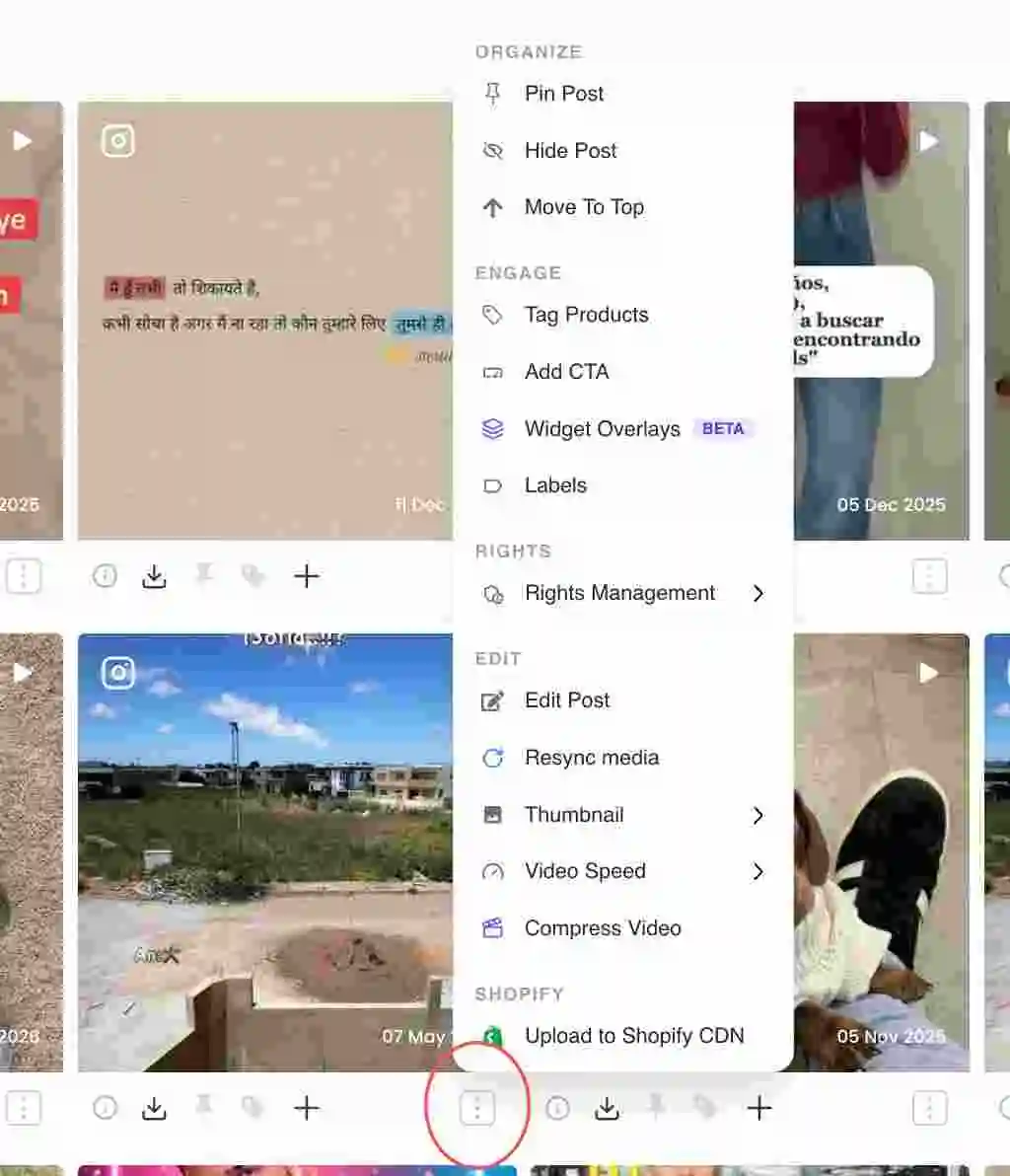
Three-dot actions menu on a post card - Choose Edit Post. W sekcji Edit kliknij Edit Post („Modify caption and details”).In the dashboard: Edit Post option under the Edit section of the post menu
- Make your changes and save. Zmień opis i wszystkie edytowalne szczegóły, a następnie zapisz zmiany. Widżet pokaże nową wersję.
Powiązane poradniki
- Ustaw lub wygeneruj miniaturę wideo: /help/set-video-thumbnail
- Dodaj etykiety do posta: /help/add-labels-to-a-post
- Dodaj CTA do posta: /help/add-a-cta-to-a-post


