
How to run a creator program from your own customers
Your best creators already tag your store. How to find them, clear rights once, brief and gift them, credit their sales and pay them. We make Idukki.
 Rohin AggarwalCo-founder & CTO · Idukki.io · November 28, 2026 · 8 min readLast updated
What changed: First published. Rival rows read from each vendor’s own page on 28 November 2026.
Every week the same handful of customers tag your store. One posts the coat on a cold walk. Another films the tote on a train. Nobody has thanked them, and you cannot tell which one sells.
Run a creator program from your own customers in four moves. Invite the people who already tag you, and clear their rights once when they join. Brief them with a free product, then credit each sale by their code or link.
This guide is for a store owner or marketer with a few regular taggers and no agency. We make Idukki, and its Creator Circle add-on does these steps. The steps work with other tools too.
In this article
1. What is a customer creator program?
It is a small team of real customers who post about your products on purpose. They get a code to share, a free product now and then, and a cut of what they sell.
It differs from hiring creators from a marketplace. These people bought from you before anyone asked. Their followers know that, and the posts look like it.
For the wider idea, read how to turn happy customers into a creator program. For levels and perks as it grows, see ambassador tiers. To mix it with affiliate links, read affiliate plus UGC.
The six jobs of a customer creator program
- 01
Find
Rank who tagged you by posts in the last 90 days.
- 02
Invite
Send a private join link. They accept your terms once.
- 03
Equip
Give each one a follower code and a tracked link.
- 04
Brief
Name the products, the posts you want and a due date.
- 05
Gift
A one-use code makes the brief’s products free.
- 06
Reward
Credit each order to one member. Pay, then mark it paid.
Next step: list everyone who tagged you in the last three months.
2. How do you set one up, step by step?
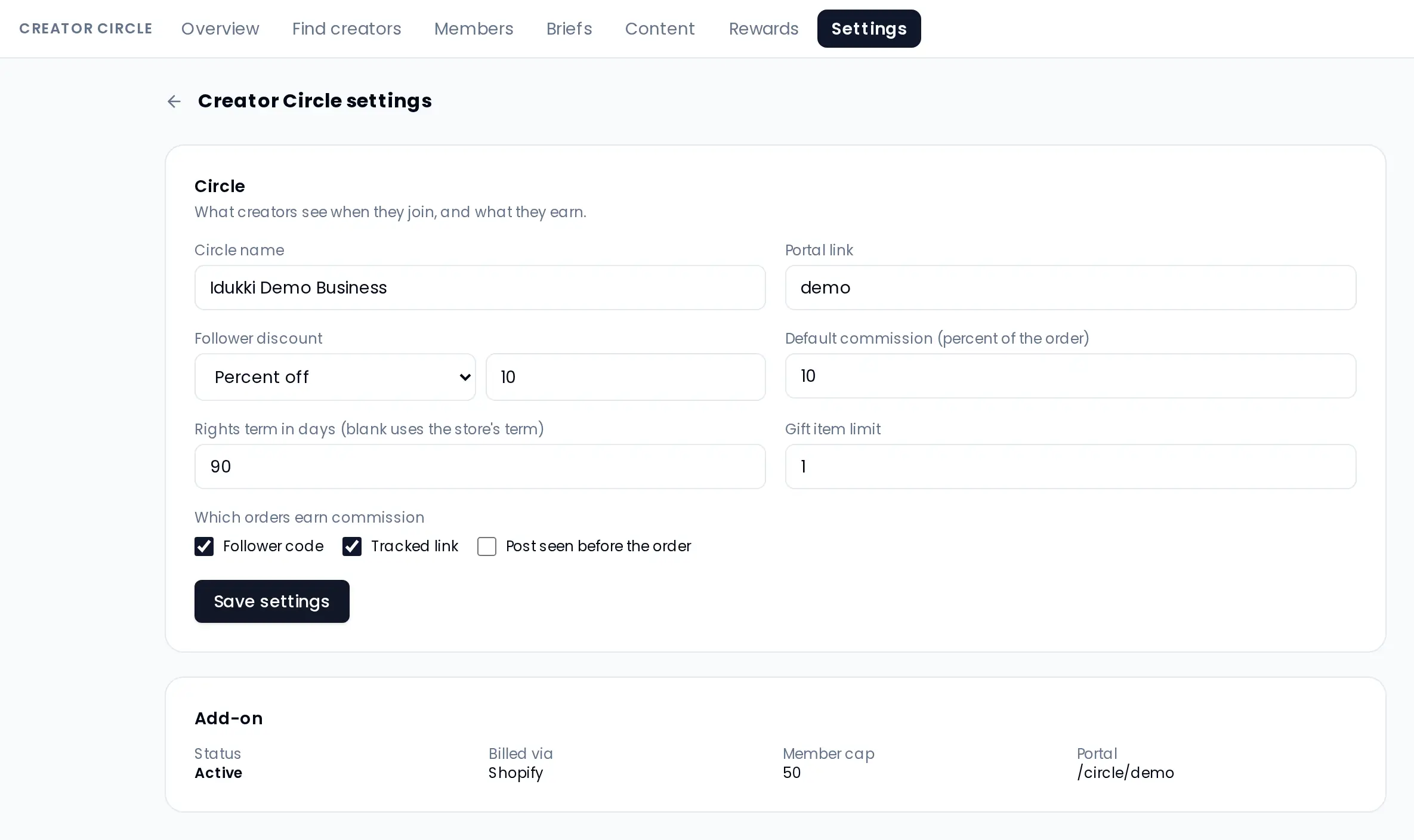
Set the rules before you invite anyone. People join faster when the discount, the pay and the rights are already written down.
Step 1: Decide the follower discount
Pick one discount every creator shares with followers, such as 10% off once per shopper. One number is easy to explain and easy to track.
Step 2: Decide what earns commission
Choose whether a code, a tracked link or both earn a cut. Set one default percent and change it per person later.
Step 3: Write the rights terms
Say where you may show their posts and for how long. Say they keep ownership and can leave any time.
Step 4: Pick a gift limit
Cap how many free items one brief can give. One item per brief keeps costs predictable.
Step 5: Invite your first five
Start small. Five regulars who answer quickly teach you more than fifty strangers.
Step 6: Send your first brief
Pick one product launching soon. Ask for one post, give a due date and a gift code.
Next step: write your rights terms in plain words before the first invite.
3. How do you find creators among your customers?
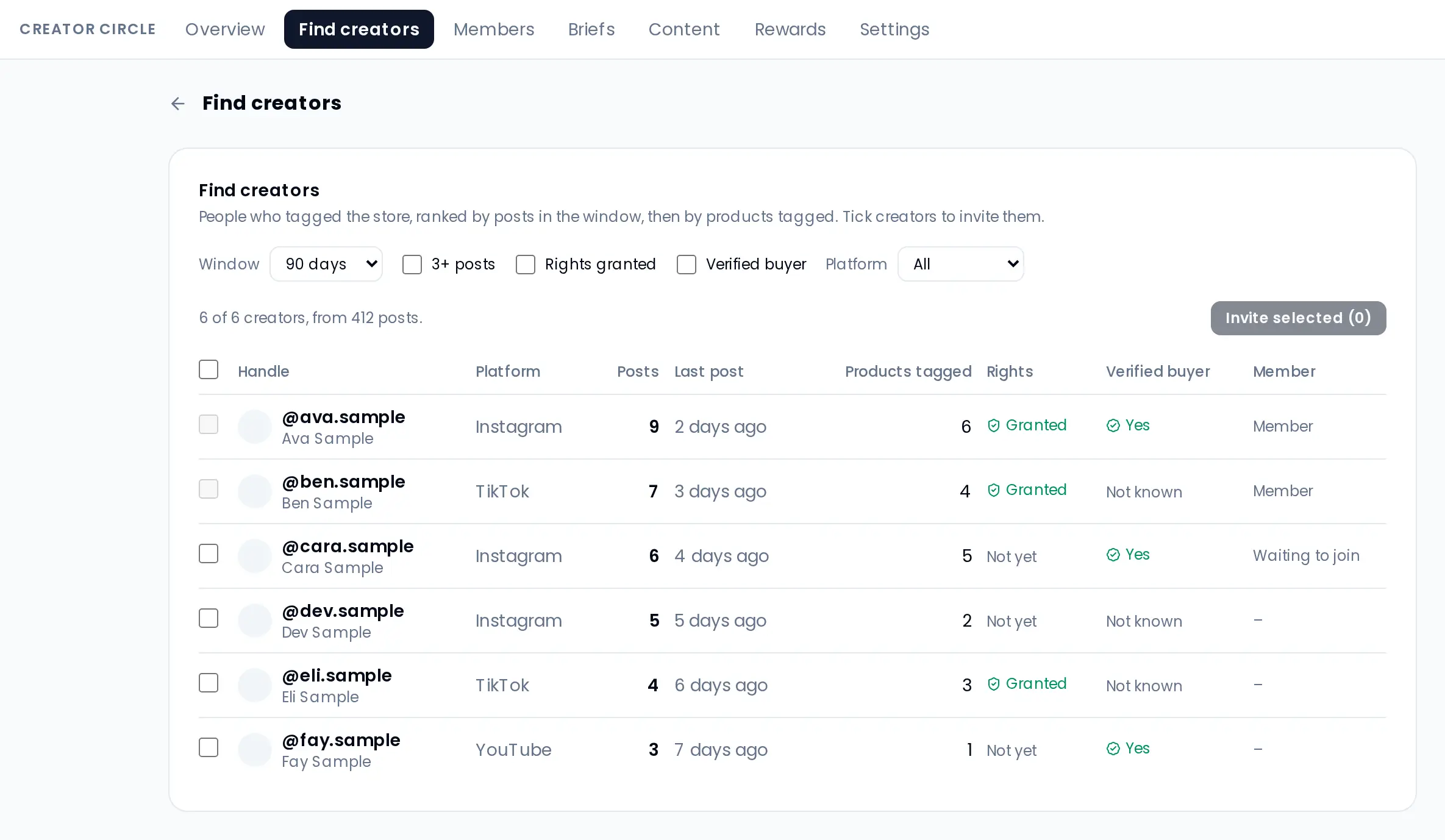
Rank everyone who tagged you by how often they post, then by how many products they tagged. Regulars beat big accounts that posted once.
A purchase matters as much as reach. A post marked as a verified buyer proves the person owns the product. A handle alone proves nothing.
More ways to spot them are in finding the micro-influencers in your customer list. Before you pay anyone, run the checks in how to vet a creator.
Creator vetting scorecard
Score a shortlist on four signals before you pay anyone.
Next step: tick the five who post most and bought from you.
4. How do you invite creators and clear their rights?
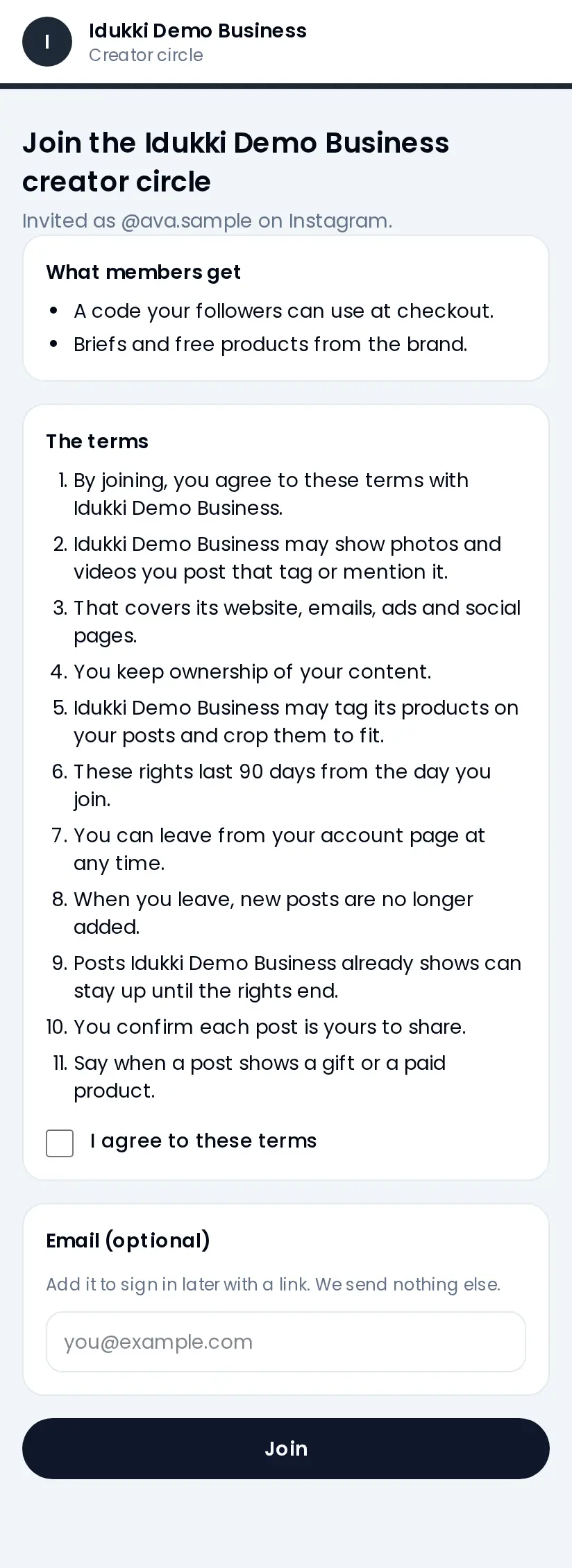
Send each person a private join link. When they join, they accept your rights terms once, and their later posts arrive cleared.
Asking per post works for one-off photos. It breaks down when the same person posts every week, because each post waits for a reply.
The trade-offs are in creator rights at sign-up. For one-off posts, use how to request UGC rights from creators.
Next step: send five join links yourself, by DM or WhatsApp.
5. How do you brief and gift creators?
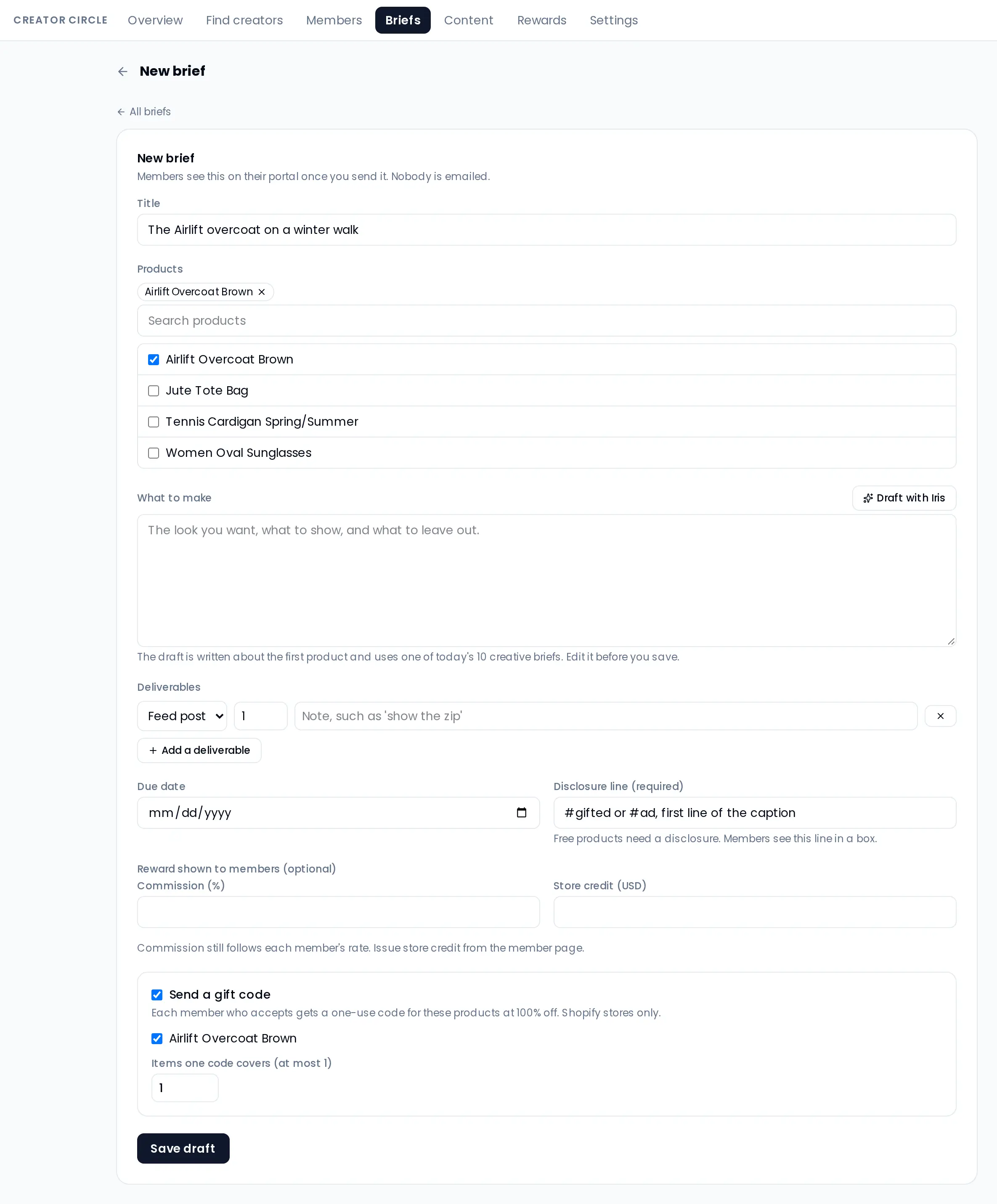
A brief names the products, the posts you want, a due date and a disclosure line. A gift code makes those products free at checkout.
The disclosure line matters. The US FTC treats free or discounted products as a material connection that followers should hear about. The UK ASA asks for clear ad labels too.
Why a code beats a parcel is in creator seeding with one-use gift codes. For wider seeding plans, read gifting and seeding programs that produce content.
Next step: write one brief for your next launch, with "#gifted or #ad" in the first line.
6. How do you credit creator sales?
Credit each order to one creator, by the strongest sign. A code on the order is exact. A tracked link is next. A post seen before the order is weakest.
Which sign credits this order?
Start here
Did the order use a creator’s code?
- Yes
Credit by code
The code names the creator. This is the most exact sign.
- No
Check the link
Did the shopper arrive through a creator’s tracked link in the last 30 days?
- Yes: Credit by link
- No, but they saw a creator’s post in your gallery: Credit by post, if you chose to pay for it
Keep these credits apart from your store’s other sales numbers. A creator-credited order can also count as a gallery sale. Adding the two counts double.
The full comparison is in code, link or post: crediting creator sales.
Next step: decide whether post touches earn anything. Most stores start with codes and links only.
7. How much should you pay customer creators?
Start with a commission on credited orders, plus free product through briefs. Add store credit for people who would rather shop than invoice.
Pay outside your UGC tool, by bank transfer or PayPal. Export what each person is owed, pay it, then mark the rows paid with your transfer reference.
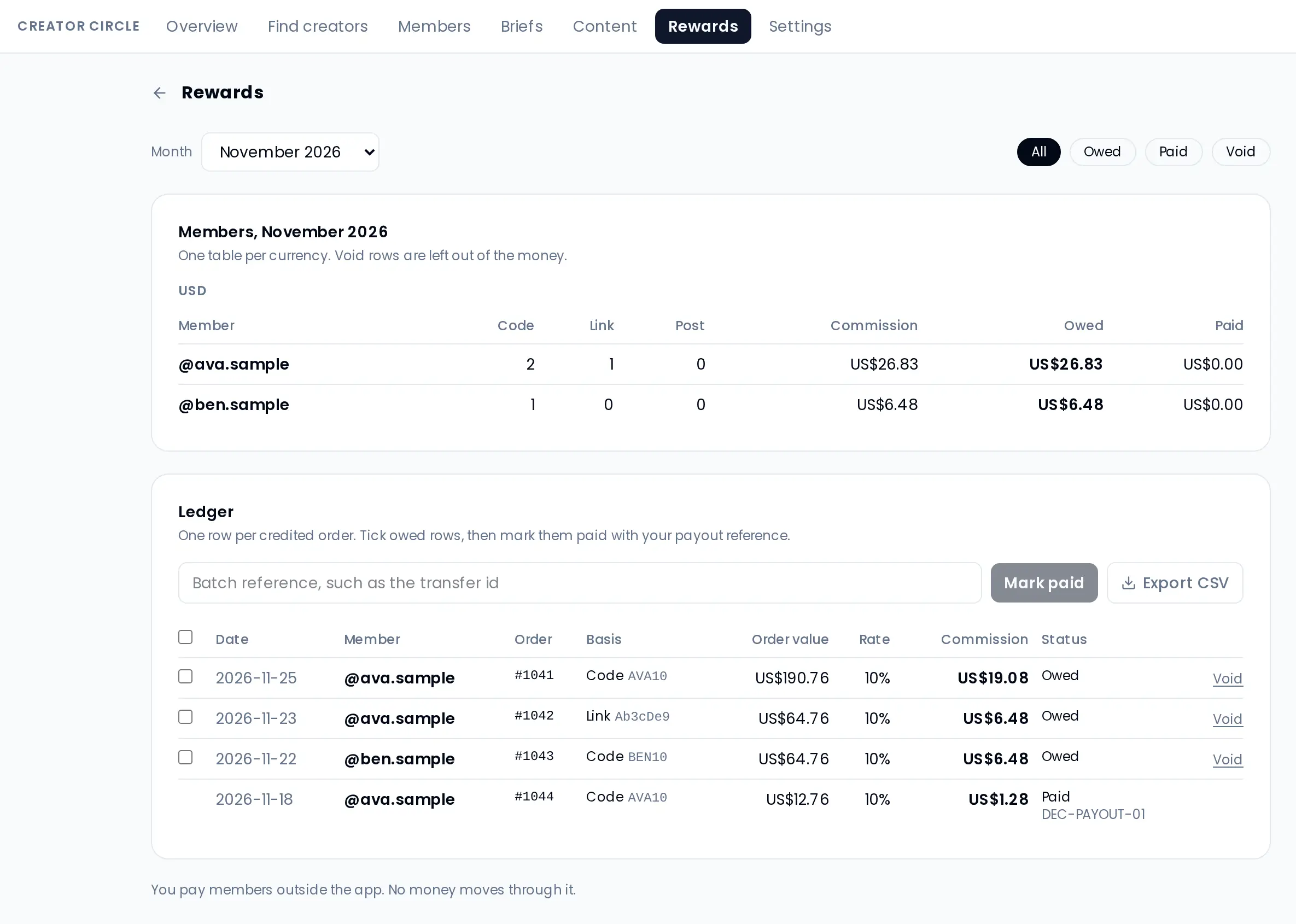
Rates and models are in how much to pay UGC creators. For retainers against gifting, read the unit economics.
Next step: set one commission rate and review it after the first month.
8. How do you choose a tool for it?
Pick on five questions: price, codes, free product, payouts and rights. We make Idukki, so read our row with that in mind.
| Question | Idukki Creator Circle (ours) | GRIN | Social Snowball | Flowbox |
|---|---|---|---|---|
| Published price | $49 a month or $490 a year, for up to 50 creators, on top of your Idukki plan. | Free $0/mo with a 20% fee on wallet deposits, up to Scale at $1,500/mo. | Not stated on the page | No price shown. "Request a demo". |
| Codes per creator | One follower code per member, on Shopify. | Not stated on the page | "Unique, single-use discount codes for every customer" who clicks. | Not stated on the page |
| Free product for content | A one-use code for the brief’s products, on Shopify. | "Product gifting", 10 gifts on Free, up to 1,000 a month on Scale. | Not stated on the page | Not stated on the page |
| Paying creators | A ledger and a CSV. You pay them. Store credit codes too. | Fees "held in escrow and paid out through Stripe". | "Bulk send cash, gift cards, and store credit payments". | "Pay everyone through a single invoice". |
| Rights to reuse posts | Accepted once at join. New posts arrive approved. | Not stated on the page | Not stated on the page | A "media rights framework" and rights requests. |
GRIN pays creators through Stripe escrow. Social Snowball bulk-sends cash, gift cards and store credit. Creator Circle leaves payment to you and clears rights at join, so member posts can go straight onto product pages.
Creator Circle costs $49 a month or $490 a year, for up to 50 creators, on top of a paid Idukki plan. See what Creator Circle does.
Next step: list your regulars, then compare one week of their posts against each tool.
Questions store owners ask
How many creators should a small store start with?
Five is enough to learn from. Add more once the first brief comes back.
Do customer creators need a business account?
No. They need a public post that tags or mentions your store.
Do I have to disclose gifted products?
Yes, in the US and UK. The FTC and the ASA both expect a clear label, such as #gifted or #ad.
Can I credit sales without discount codes?
Yes. A tracked link works on any store. Codes need a store that makes them, such as Shopify.
What does Creator Circle cost?
$49 a month or $490 a year, for up to 50 creators, on top of a paid Idukki plan.
Sources
- 1FTC: Disclosures 101 for social media influencers · Free or discounted products count as a material connection.
- 2ASA: Influencers’ guide to making clear that ads are ads · UK expectations for labelling influencer posts.
- 3GRIN: pricing · Read 28 November 2026.
- 4Social Snowball · Read 28 November 2026.
- 5Flowbox · Read 28 November 2026.
- 6Idukki: Creator Circle · Price and what the add-on does.
- 7Idukki help: Get started with Creator Circle · Settings and setup, with screenshots.
Continue reading
3 pieces in this clusterMore on this topic. Each of these articles links back here.
- Rights and compliance
Creator rights at sign-up: one consent for every future post
Asking for rights on every post stalls a creator who posts weekly. Clear them once at sign-up instead. What the terms say, what to keep, and what leaving does.
- Measurement
Code, link or post: how to choose a way to credit creator sales
A discount code, a tracked link and a post the buyer saw each credit creator sales differently. What each one catches, what it misses, and the order to trust them in.
- Strategy
Creator seeding with one-use gift codes on Shopify
Send creators a one-use code that makes the brief’s products free. They choose size and colour at checkout, and the order tells you who it was for.
More from Rohin Aggarwal
- Strategy
Creator retainers vs. one-off gifting: the actual unit economics
Gifting is a lottery ticket: wide, cheap, and mostly silence. A retainer is a subscription: narrower, costlier per creator, and far more predictable per usable piece of content.
- Strategy
Gifting and seeding programs that actually produce content
Untargeted gifting mails free product into a void. A seeding program is designed. It has chosen recipients, a light expectation and a rights path.
- Strategy
Creator seeding with one-use gift codes on Shopify
Send creators a one-use code that makes the brief’s products free. They choose size and colour at checkout, and the order tells you who it was for.