IdukkiIdukki

How it works

From a customer’s post to a proven sale.

Idukki works in seven steps. Collect what customers post, let AI tag your products, clear the rights, pick a layout, publish it where people decide, let shoppers add to cart from the post, and see which posts actually sold.

PageSpeed 99 and layout shift 0 on a live widgetLast updated

Idukkiidukki

Step 01 · Collect

Every post about your brand, in one library.

Pull posts from Instagram, TikTok, YouTube, X, LinkedIn, Threads, Pinterest and Facebook by hashtag, mention or profile. Add Google, Trustpilot and TripAdvisor reviews, files from Google Drive or Dropbox, and photos customers upload themselves.

No code

One post’s journey · 01A customer films her weekend outfit and tags you.

Go deeper:Collect UGCReviewsUGC competitions

01 / 07

Add a source

Dashboard

Select media source

InstagramTikTokYouTubeXLinkedInThreadsPinterestFacebook

Find by

HashtagsTaggedReelsUsernameStories
#yourbrandImport
UploadGoogle DriveDropbox

Reviews too: Google, Trustpilot, TripAdvisor.
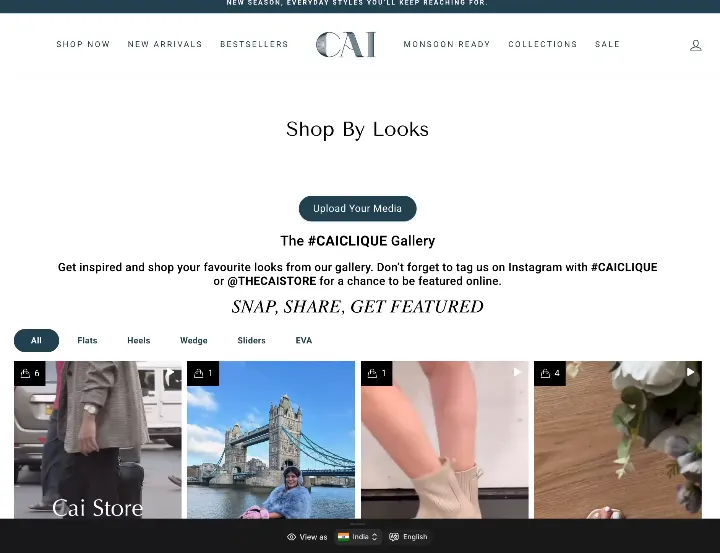
Shop-by-looks UGC gallery live on thecaistore.com

Shoppers upload their own looksLive on thecaistore.com

Import

Hashtags · Mentions · Profiles · Reviews · Uploads
Idukkiidukki

Step 02 · Tag

AI tags the products. You approve.

Smart Assist matches each photo or video to your catalogue and shows how sure it is. Nothing is tagged until you tick it. Prefer to do it by hand? Pin hotspots on a photo, or on a moment in a video.

Synced with your catalogue

One post’s journey · 02Smart Assist spots the sunglasses and the shorts in her clip. You tick both.

Go deeper:AI taggingModeration

02 / 07

Reel · @customer

Smart Assist

Demo data

Select a region or use the full image. AI matches your catalogue.

  • Women Oval Sunglasses96% matchOval frame, worn in the first seconds
  • Airlift High-Waist Suit Up Shorts91% matchHigh waist, tailored suit fabric
  • WROGN Men Silver-Toned Watch38% matchWrist visible, no clear match
Select all Apply (2)

Product tagging

AI match · Confidence · Hotspots · Video moments

Idukkiidukki

Step 03 · Rights

Ask permission once. Keep the proof.

Send the creator a signed consent link. Their yes is stored with the exact wording they agreed to and the time they agreed, and you can export it as evidence whenever someone asks.

Audit trail

One post’s journey · 03She taps your link and says yes. The yes is on file.

Go deeper:Rights management

03 / 07

Rights request

Example

To @customer

Hi! We love your post and would like to show it on our store. If that is OK, tap the link to agree.

Consent link · signed

  1. Request sentSigned link, valid 30 days
  2. Creator opened the linkConsent statement shown
  3. ApprovedWording, time and link stored

Evidence record

consent statement · version · SHA-256

Export PDF CSV

Rights management

Signed link · Consent text · Timestamp · Export

Idukkiidukki

Step 04 · Display

Galleries that look like your store.

48 layouts to choose from, including Grid, Masonry, Shoppable Reel, Stories Ring, Wall of Love and Player Hotspots. Fonts, colours and spacing follow your brand.

48 layouts

One post’s journey · 04Her clip joins a Shoppable Reel on your homepage.

Go deeper:Widgets + layoutsShoppable videoPerformance

04 / 07

Choose a layout

48 layouts
GridMasonryShoppable ReelStories RingWall of LovePlayer HotspotsMap Pins
Shop-by-looks UGC gallery live on thecaistore.com
Live on thecaistore.com
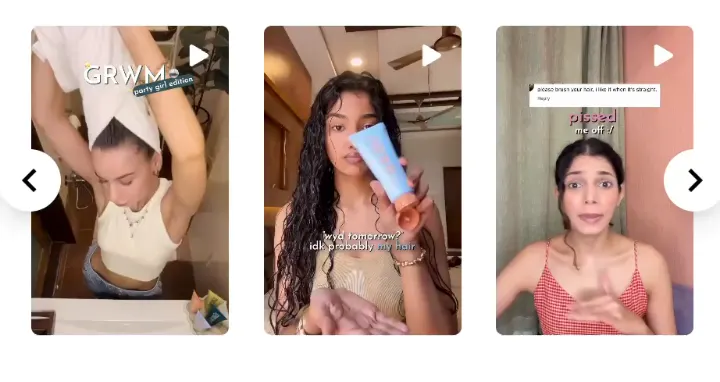
Reel carousel of customer hair-care videos live on fixmycurls.com
Live on fixmycurls.com
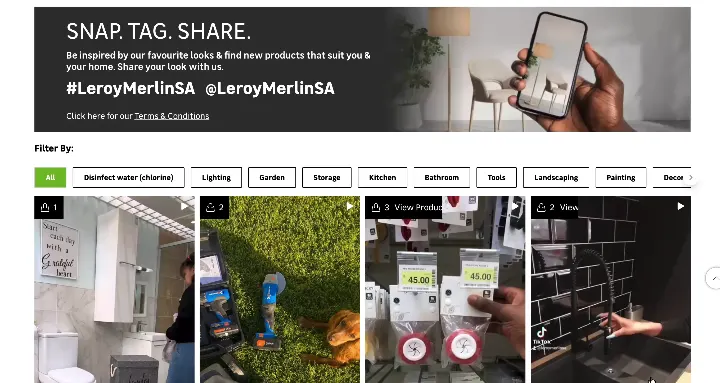
SNAP. TAG. SHARE. inspiration wall of customer home photos live on leroymerlin.co.za
Live on leroymerlin.co.za
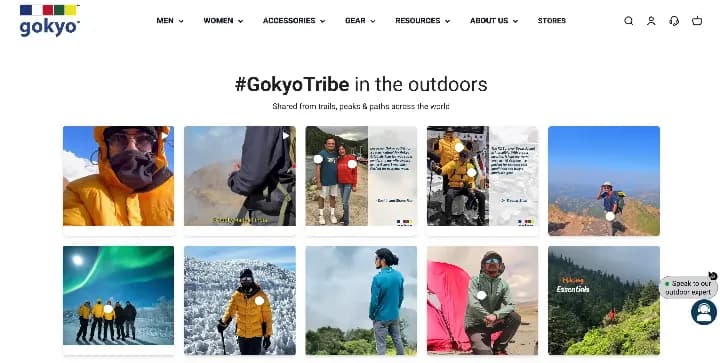
#GokyoTribe outdoor gallery of customer photos live on gokyo.in
Live on gokyo.in

Real Idukki galleries on customers’ stores.

Widget layouts

Grid · Shoppable Reel · Stories Ring · Wall of Love

Idukkiidukki

Step 05 · Publish

Put the proof where people decide.

Product pages, the homepage and collection pages from one embed. The same library feeds link in bio, in-store Scan to Shop QR codes and a web feed your email tool can read.

One embed

One post’s journey · 05A shopper on your product page sees it right under the price.

Go deeper:IntegrationsScan to ShopLink in bioEmail

05 / 07

Where should it show?

  • Product pages
  • Homepage
  • Collection pages
  • Scan to Shop QR
  • Email web feed
<div data-ugc="idukki" data-guid="…">
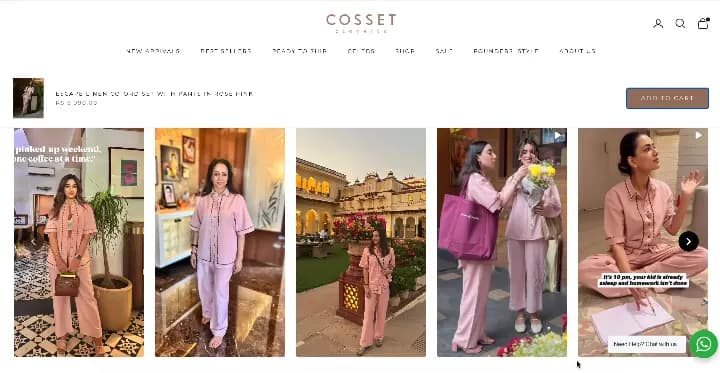
Customer photo carousel under the buy box on a cossetclothing.com product page
Live on cossetclothing.com

Customer photos under the buy box.

Placements

Product page · Homepage · Collection · QR · Email

Idukkiidukki

Step 06 · Shop

Add to cart without leaving the video.

Shoppers pick a size and add to cart inside the gallery on Shopify, WooCommerce, Magento, BigCommerce, PrestaShop and Salesforce Commerce Cloud. On any other store the tile opens the product page.

In-gallery cart

One post’s journey · 06A shopper taps the shorts, picks a size and adds them to cart from the video.

Go deeper:Shoppable videoPlatforms

06 / 07

@customer 1 product

Airlift High-Waist Suit Up Shorts

$64.76

Size

XSSML
Add to cart
Added to cart, right from the video.

Shoppable video

Variants · Price · Add to cart · 6 platforms

Idukkiidukki

Step 07 · Measure

Know which posts actually sold.

Proven revenue counts only orders where the shopper added the product to cart from the gallery first. Orders from shoppers who saw or clicked the content and bought another way are reported beside it as influenced, never added on top. On Shopify every order is matched from the store’s own order webhook, not a browser pixel alone.

Proven vs influenced

One post’s journey · 07Her clip shows up in your report, with the orders it proved.

Go deeper:AnalyticsAttributionOrders ledger

07 / 07

Revenue · last 30 days

Demo data

Proven revenue

$8,420

61 proven orders

Influenced orders

214

Proven + saw or clicked first

Store orders seen

1,180

From the order webhook

Top posts

Proven · Influenced

  • Reel · Suit Up Shorts$1,166 · 18 / 64 orders
  • Photo · Jute Tote Bag$140 · 11 / 48 orders
  • Reel · Oval Sunglasses$88 · 6 / 37 orders

Proven and influenced are reported side by side and never added together.

Analytics

Proven revenue · Influenced orders · Per post · Per product

“One post’s journey” is an illustration of how a single post moves through Idukki, not a named customer. Dashboard figures in the cards are demo data. Products in the mocks are sample products. The store screenshots are real Idukki galleries on the stores named.

Two stores, real customer content. Their numbers.

Proven revenue counts only orders where the shopper added to cart from the gallery first, so it is a floor, not the whole effect.

CAI Store’s shop-by-looks gallery on thecaistore.com: customer photos of its footwear with an Upload Your Media button
CAI Store logo

CAI Store

Shop-by-looks UGC wall and shoppable reels

Proven revenue
₹2.86M
Proven orders
884
Add-to-carts
1,158

7.89M gallery impressions since January 2026.

Read the CAI Store case study
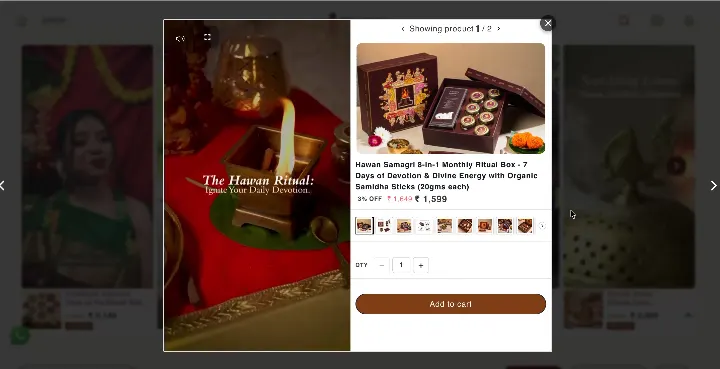
A customer video on ritualistic.in with the tagged ritual kit and an Add to cart button beside it
Ritualistic logo

Ritualistic

Customer videos with add to cart on the clip

Proven revenue
₹164K
Proven orders
62
Add-to-carts
1,657

1.55M gallery impressions since January 2026.

Read the Ritualistic case study

Source: Idukki production analytics, lifetime, refreshed 2026-10-01.

Questions, answered.

Still unsure? Talk to us, or read the full feature list. Company, pricing and compliance facts are on one page: Idukki facts.

  • How long does it take to set up Idukki?

    Connecting a source, picking a layout and pasting one embed is a single sitting for most stores. Tagging and rights requests run as content arrives, so you can go live with a first gallery and add to it.

  • Where does the content come from?

    Instagram, TikTok, YouTube, X, LinkedIn, Threads, Pinterest and Facebook (by hashtag, mention or profile), Google, Trustpilot and TripAdvisor reviews, files from your computer, Google Drive or Dropbox, and photos customers upload through a form on your site.

  • Does the AI tag products without me checking?

    No. Smart Assist suggests matching products from your catalogue with a confidence score, and a tag is only applied when you select it. You can also tag by hand with photo hotspots or timed video hotspots.

  • Can shoppers buy without leaving the gallery?

    Yes on Shopify, WooCommerce, Magento, BigCommerce, PrestaShop and Salesforce Commerce Cloud: the shopper picks a variant and adds to cart inside the gallery. On other platforms the tile links to the product page.

  • What is the difference between proven and influenced revenue?

    Proven revenue counts orders where the shopper added the product to cart from the Idukki gallery before buying. Influenced orders are orders from shoppers who saw or clicked the content and bought another way. Idukki reports the two side by side and never adds them together.

  • Will the widget slow my store down?

    A live Idukki widget scored 99 for performance on PageSpeed Insights (desktop, measured 12 Jun 2026) with 0 ms total blocking time and a layout shift of 0. The exact widget URL is on the performance page so you can run it yourself.

Your customers already made the content. Let it sell.

Connect a source, tag a post and put it on your product pages today. Every feature is on every plan.

We use cookies

We use essential cookies to run this site and optional analytics cookies to understand how it’s used. You can change your choice anytime in our privacy policy.