
How to ask Instagram creators for UGC rights at scale without looking like spam
One comment per post, spaced out, in your own words. The creator’s reply is the proof, and silence is a no. The rules we built into our Chrome extension.

Monday, ten o’clock. Your collection holds a backlog of customer photos, and none of them has rights. Pasting one comment under every post would clear it by lunch. It would also read like a bot wrote it.
In this article
We make Idukki and its free Idukki Rights Requester Chrome extension. The rules below are the ones we built into it. They work just as well by hand. This is a process guide. It is not legal advice.
One request, start to finish
- 01
Pick the post
It is in your library and nobody has asked yet.
Check first
- 02
Comment once
Their handle, your hashtag, from your brand account.
One per post
- 03
Wait before the next
A random gap between comments, and short runs.
35 to 75 s
- 04
Read the reply
The post’s owner answers with your hashtag.
Their words
- 05
Keep the record
Store the reply with the post before it goes live.
Evidence
What makes a rights request look like spam
A creator sees a comment from a brand they may not follow. They decide in a second whether a person wrote it. Four habits make that decision go against you.
The same ask, two ways
Reads like a bot
- The same words pasted under many posts in a minute
- No handle, no hint of which photo you mean
- A second and third comment when they stay quiet
- A like on your comment logged as a yes
Reads like a person
- One comment, under the post you want
- Their handle and a short reason
- Gaps between comments, and a stop when Instagram pushes back
- Only their reply with your hashtag counts
One comment per post, on the post itself
Ask under the photo you want to use. The creator sees exactly which post you mean. Anyone who reads the thread later sees the ask too. Asking under a different post, or in a story reply, loses that trail.
Check before you ask. A post you already cleared needs no second comment. In Idukki, a post that already has rights is left alone. Post all skips posts that are not in Idukki or already have rights.
Make the comment theirs
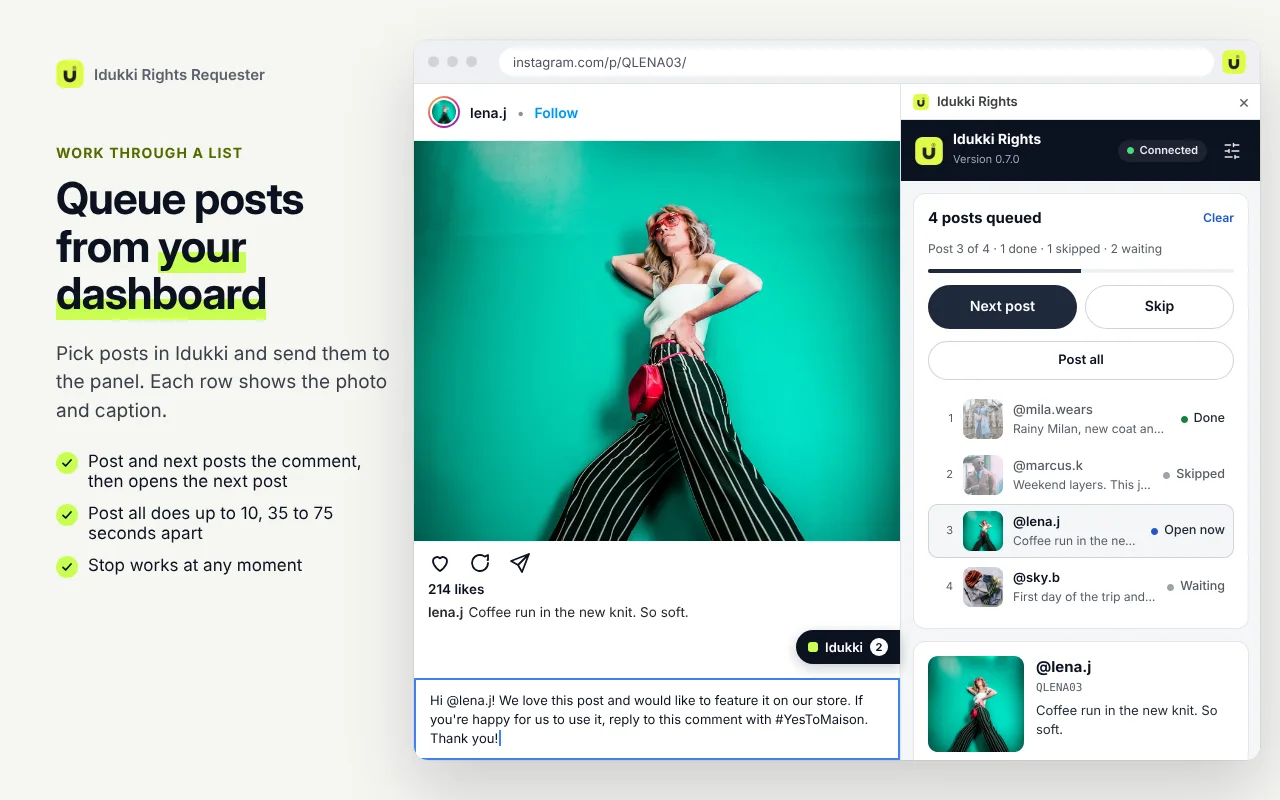
Use the creator’s handle. Say you want it on your store. Give one reply that means yes: your approval hashtag. This is the default message in an Idukki dashboard.
Hi @[Name]! We love this post and would like to feature it on our store.
If you're happy for us to use it, reply to this comment with #[HashTag]. Thank you!
Pick a hashtag only your brand would use, such as #YesBrandYouCan. Then a reply that carries it is a real answer to you. Edit the words to sound like your brand. Keep the handle and the hashtag. The extension fills both into each comment.
Want it in an email or an ad as well? Say so in the comment, or send a consent link. A yes to your store covers your store. The wording for each route is in Instagram UGC rights request templates.
Space the comments out
A long queue tempts you to clear it in one go. Do it in short runs instead. These are the limits our extension keeps, whatever the queue holds.
10
comments at most in one Post all run
35–75 s
random gap between two comments
1
confirm click before a run starts
15 s
to see each comment on the post, or the run stops
The gap is random, so comments do not land on a fixed beat. We don’t know where Instagram’s limit sits. So we keep runs small and leave the next run to you.
Stop when Instagram pushes back. A “Try again later” notice or a login page means stop for now. Post all stops on either, and when you press Stop. Every comment goes out from your own account, so your account carries the risk.
Let the creator’s reply be the proof
A yes is a reply from the post’s owner that carries your hashtag. Anything else needs a person to decide. This table is the rule Idukki uses.
| What happens | Counts as yes? |
|---|---|
| The owner replies to the post with your hashtag | Yes, approved automatically |
| The owner replies under your comment with your hashtag | Yes, approved automatically |
| Someone else replies with your hashtag | No |
| The owner likes your comment | No |
| The owner says “sure” without the hashtag | Only if you approve it by hand |
| The owner says yes by DM | Only if you approve it by hand |
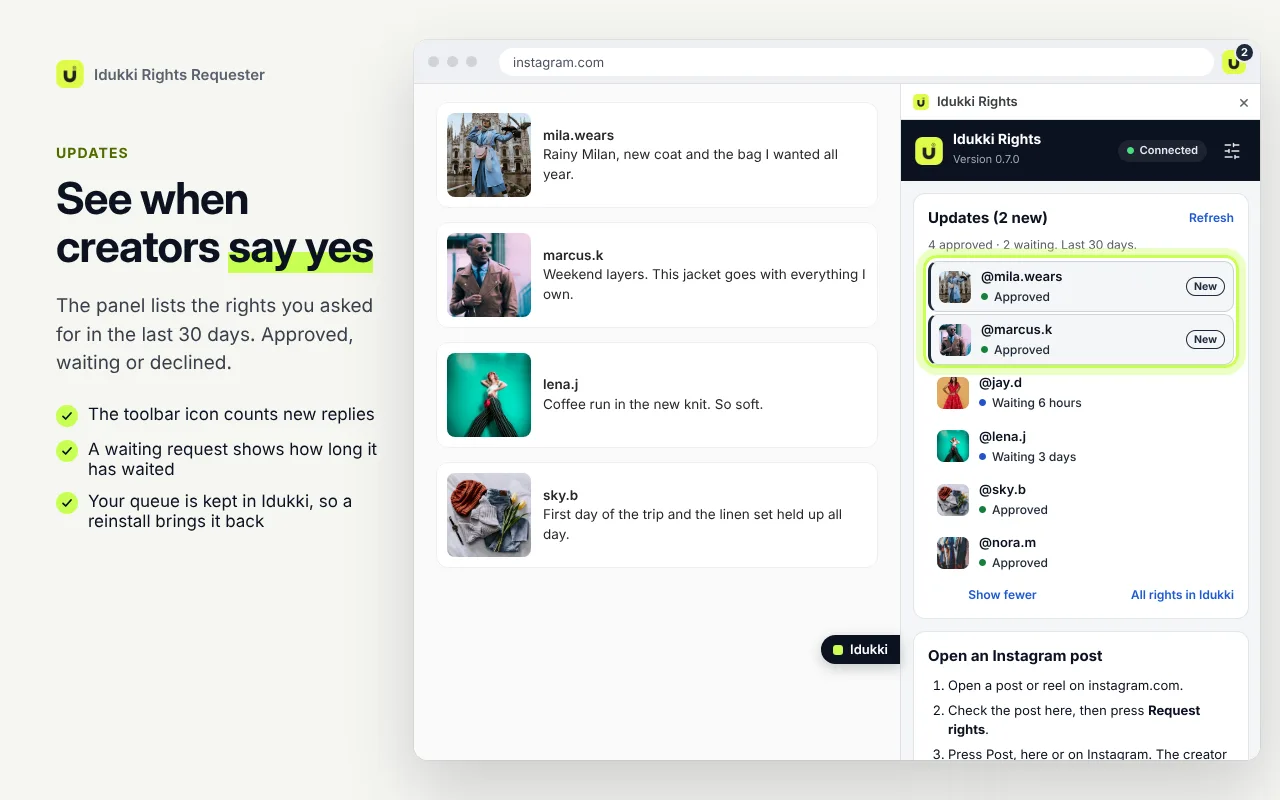
Idukki reads the replies on your pending Instagram requests every hour. It covers requests from the last 30 days. The reply is stored as evidence on the post’s rights record. If the creator changed their handle, Idukki looks up the post’s owner first.
Never approve on silence
No reply means no. The post stays pending, and a rights-gated collection keeps it off your store. Follow up once, by DM or with a consent link. Then let it go.
Keep an eye on what is waiting. The extension’s Updates list shows every request from the last 30 days. Each one reads approved, waiting or declined. A waiting one shows its age, such as “Waiting 3 days”.
Set it up in Idukki
Add the extension from the Chrome Web Store. In Idukki, open Settings, Integrations, Chrome extension and create a key. Paste it into the panel’s Settings. Then open any Instagram post and click Request rights. The steps, with screenshots, are in the Chrome extension guide. The whole rights workflow is on rights management.
Common questions
Is a hashtag reply enough consent?
It is a clear, public yes to what your comment asked. For ads, or for long use, also send a consent link that names each use. Check your own legal advice.
Should I DM instead of commenting?
A comment lands in their notifications. A DM from a brand they do not follow may sit in message requests. Comment first. The extension can open a DM too, and you approve a DM reply by hand.
How many requests can I send a day?
We don’t know Instagram’s number. Our extension caps a run at 10 and stops when Instagram pushes back. Start small and watch for “Try again later”.
Does the extension post without me?
No. It posts only when you click Post comment, Post and next or Post all. You confirm Post all first.
Which plan do I need?
Rights requests and the extension are on every Idukki plan, Free included.
More from Rohin Aggarwal
- Rights and compliance
Instagram UGC rights requests: two messages, a consent page and the proof to keep
Copy-ready templates for a public comment, a DM and a consent page. Plus what to store as proof and what to do when the answer is no.
- Rights and compliance
How to request UGC rights from creators in Idukki
Ask a creator for permission by comment or by consent link. The steps in Idukki, and the record it keeps.
- Rights and compliance
How to legally collect UGC from Instagram and TikTok
A repost is not permission. To put a customer's photo or video on your store or in an ad you need a documented licence, with a recorded reply that grants it.