
 idukki
 SAP Commerce Cloud
Embed code
Shoppable UGC on SAP Commerce, one template change away.
One script in your page template and a CMS component per gallery. Galleries and shoppable video work today. There is no SAP extension, catalogue sync or order feed.
No app to install · we plan it with you
- No app to install
- Links to your product pages
- Loads after the page
- ~79 KB gzip core
- ~79 KBgzip widget core, loaded after your page
- 161%higher conversion among shoppers who interact with UGCYotpo, 200k+ stores / 163M orders analyzed
- 92%trust recommendations from people they know above all other advertisingNielsen, Global Trust in Advertising














SAP Commerce Cloud, honestly
Your SAP Commerce storefront ships on a release train. The UGC ticket has slipped another sprint. Your product pages still show catalogue images only.
Idukki needs one script in the page template and one placeholder per gallery. Posts, rights and tags then change outside your releases.
What works on SAP Commerce Cloud today, and what does not
Works today
- Galleries and shoppable videoAdd the script to your page template. Place galleries with a CMS component in SmartEdit.
- Your cart, with a developerA developer connects your cart with one JavaScript hook. Then shoppers add to cart in the gallery.
- Product tags on every postImport products by CSV file or CSV link, or add them by hand. Then tag posts.
- Views and clicks, countedIdukki counts gallery views and product clicks. Every product link carries UTM tags.
- Add to cart, out of the boxIdukki has no SAP Commerce cart adapter.
Instead: Without the hook, product buttons open your product page. With it, they add to your cart.
- Catalogue, price and stock syncThere is no SAP Commerce extension, so the catalogue does not sync.
Instead: Export your catalogue to CSV and import the file or its link. Re-import it on a schedule you run.
- Orders matched to postsSAP Commerce orders do not reach Idukki, so no sale is credited to a post.
Instead: Filter your own analytics by utm_source to see gallery visits and the sales after them.
Install notes for SAP Commerce Cloud
- Check that your CMS component keeps data- attributes. If it strips them, a developer adds a small component.
- On Composable Storefront, the widget finds placeholders added within 30 seconds of a page load.
How it installs here
One template change, then galleries from SmartEdit, SAP Commerce Cloud
There is no SAP Commerce extension or catalogue sync. A developer adds the script once. Editors place galleries.
Install on SAP Commerce Cloud with the page template + cms componentReal integration primitive: Page template + CMS component
<!-- once, in the storefront page template -->
<script src="https://idukki-cdn.com/version/script_0" async></script>
Gallery live on SAP Commerce Cloud
Tagged posts open the product. The button opens your product page.
Widget layout library
Pick the layout, not the integration
Every style ships on SAP Commerce Cloud from the same page template + cms component. Swap layouts without touching code.
- Shoppable reelAny page · one embed
- Stories railAny section · one embed
- Shoppable hotspotsInside any gallery post

@lou_keys
Typing therapy · mech keyboard
Live preview
SAP Commerce Cloud, shoppable wall
Tap any tile to open the product drawer. This is the live widget, not a screenshot.
- @lou_keys 388 32
- @ana_speaker 222 14
- @trip_action 401 25
- @workout_smart 178 11


Click any pin to open the product card · Plug your handle, paste the embed.
Interactive formats
Six shoppable formats, live on SAP Commerce Cloud.
Past the standard wall, the same widget runs interactive formats: hotspots, stories, lookbooks and more. On SAP Commerce Cloud, product buttons open your product page.
Fashion + apparel
Each format below renders live with this industry’s real demo content.
Shop the Look. Tap-to-shop hotspots over a lifestyle image, with a shop-this-look rail. Where it fits: Homepage hero · campaign landing pages.
One data model
From a customer clip, to measured revenue
- 01Capture
Pull clips from social, reviews, and upload.
- 02Rights
One-tap creator permission, logged.
- 03AI tag
Auto-match every clip to the right SKU.
- 04Publish
Render to any surface on SAP Commerce Cloud.
- 05Measure
Count views and clicks. UTM tags carry visits to your analytics.
Zero site-speed impact
99/100 on a live production widget.
- Performance
- Accessibility
- Best Practices
- SEO
Values are estimated and may vary. Measured 12 Jun 2026 on the live widget.
- 0.4 sFCP
- 0.9 sLCP
- 0 msTBT
- 0CLS
- 1.0 sSpeed Index
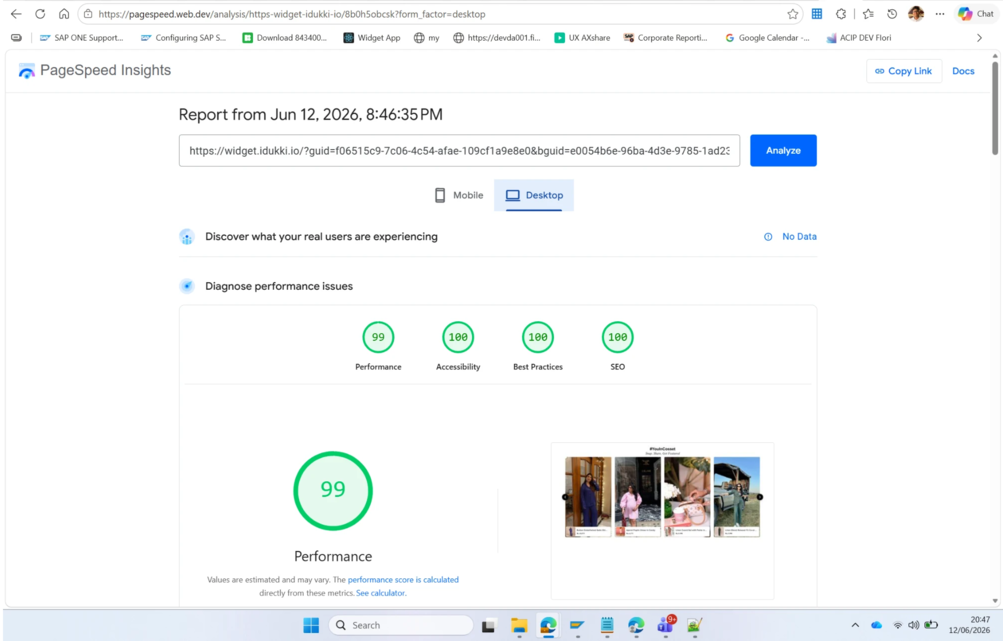
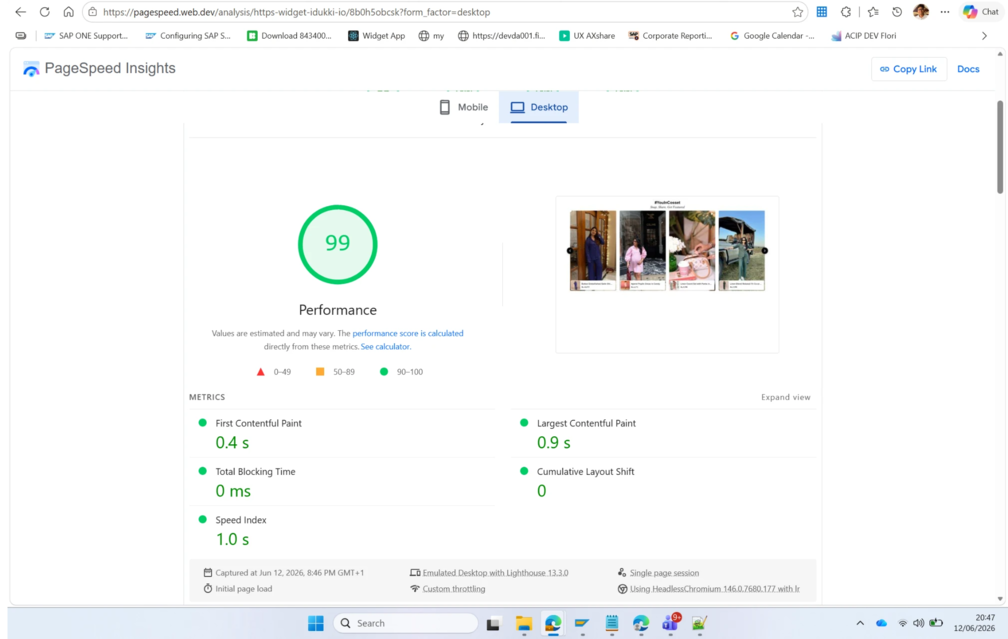
A production Idukki gallery on widget.idukki.io: a lazy-loaded runtime with 0 ms blocking time and CLS 0 that does not move your Core Web Vitals. The widget earns the score, not this page; the runtime's measured byte sizes are on the performance page.
Run it yourself on PageSpeed- LCPLargest Contentful PaintStays under 2.5s
- CLSCumulative Layout ShiftUnder 0.1, reserved space
- INPInteraction to Next PaintUnder 200ms
Thresholds shown are Google’s Core Web Vitals “good” boundaries. The headline scores above are a real, dated measurement of the live widget.
Where idukki ships on SAP Commerce Cloud
One data model, every surface a shopper meets
Pick the placements that fit your SAP Commerce Cloud storefront. They all read the same catalogue and the same approved UGC.
 PDPPDP galleryWhite Sweater · $110.76Shop
Shoppable UGC hot-spotted to every SKU on the product page.
HOMEHomepage heroNew season · ShopShop
A full-bleed video hero that routes shoppers into collections.
PLPCategory stripAirlift Shorts · $64.76Shop
Inline UGC row merchandised across any collection page.
STORIESStories railTennis Cardigan · $80.23Shop
A sticky story bar above the fold, IG and TikTok-native UGC.
COMMUNITYCommunity wallJute Tote · $12.76Shop
A moderated social wall of customer posts, filterable by tag.
 FEEDInspiration feedBodycon SPF 50 · $64.76Shop
An editorial shop-the-feed grid for lookbooks and drops.
 HOTSPOTSHotspotsWROGN Watch · $24.76Shop
Tappable product pins layered onto any image or video.
Already running a UGC tool?
Switching to Idukki on SAP Commerce Cloud takes an afternoon.
Keep your catalogue and clips. We map your existing setup and go live on the page template + cms component, with no re-platforming.
Answers for SAP Commerce Cloud teams
Quick answers from our team. If yours isn’t here, ask via the contact form.
How do I install Idukki on SAP Commerce Cloud?
Paste the Idukki embed code: embed code in your storefront template. It works on SAP Commerce Cloud today. There is no SAP Commerce Cloud app or extension to install.
Will the widget slow down my SAP Commerce Cloud store?
The widget core is ~79 KB gzip. It loads after your page, when the gallery scrolls into view. It reserves its space so the page does not jump.
Is there an SAP Commerce extension or AddOn?
No. The script and placeholders are the whole install. Nothing goes into your build or your extensions.
Does it work on Composable Storefront (Spartacus)?
Yes, with a developer. Load the script in index.html and render the placeholder from a CMS component. Galleries on later in-app routes need checking on the setup call.
Can I tag products from my SAP Commerce catalogue?
Yes, once they are in Idukki. Import a CSV export of your catalogue, as a file or a link.
Can shoppers add to cart inside the gallery?
Yes, once a developer defines window.__IDK_CART__.addToCart. Without it, product buttons open your product page.
Will Idukki show which orders came from the gallery?
No. SAP Commerce orders do not reach Idukki. Product links carry UTM tags for your own analytics.
Book a setup call
Add UGC to SAP Commerce.
Book a 30-minute setup call. We look at your SAP Commerce Cloud site, plan where galleries go and walk through the catalogue import.
- No app to install
- Links to your product pages
- Loads after the page
- ~79 KB gzip core
Add your store URL and monthly visits on the next page. Then pick a time.
Book a setup callNewsletter
Get the next post first.
Monthly UGC and shoppable-video benchmarks, A/B post-mortems, product updates. No spam, unsubscribe in one click.
One email per piece. No drip sequences, no sales follow-up. Unsubscribe with one click.