
Jak poprosić twórców o prawa do UGC w Idukki
Poproś twórcę o zgodę komentarzem lub linkiem do zgody. Kroki w Idukki i zapis, który zostaje.

Twoja klientka opublikowała najlepsze zdjęcie Twojej sofy, jakie kiedykolwiek widziałeś. Zespół od reklam chce je na poniedziałek. Nikt jej nie zapytał. Jeśli odmówi, gdy reklama już ruszy, musisz ją wycofać i przeprosić. Zapytanie z góry zajmuje dwie minuty.
W Idukki każdy post ma menu Rights Management. Możesz poprosić o zgodę komentarzem, na który twórca odpowiada hashtagiem. Możesz też wysłać twórcy link do zgody. Obie drogi zostawiają zapis, który pokażesz później. Oto kroki.
Jak to zrobić w Idukki
Krok 1: otwórz Rights Management przy poście
- 1W Collections otwórz kolekcję, w której jest post.
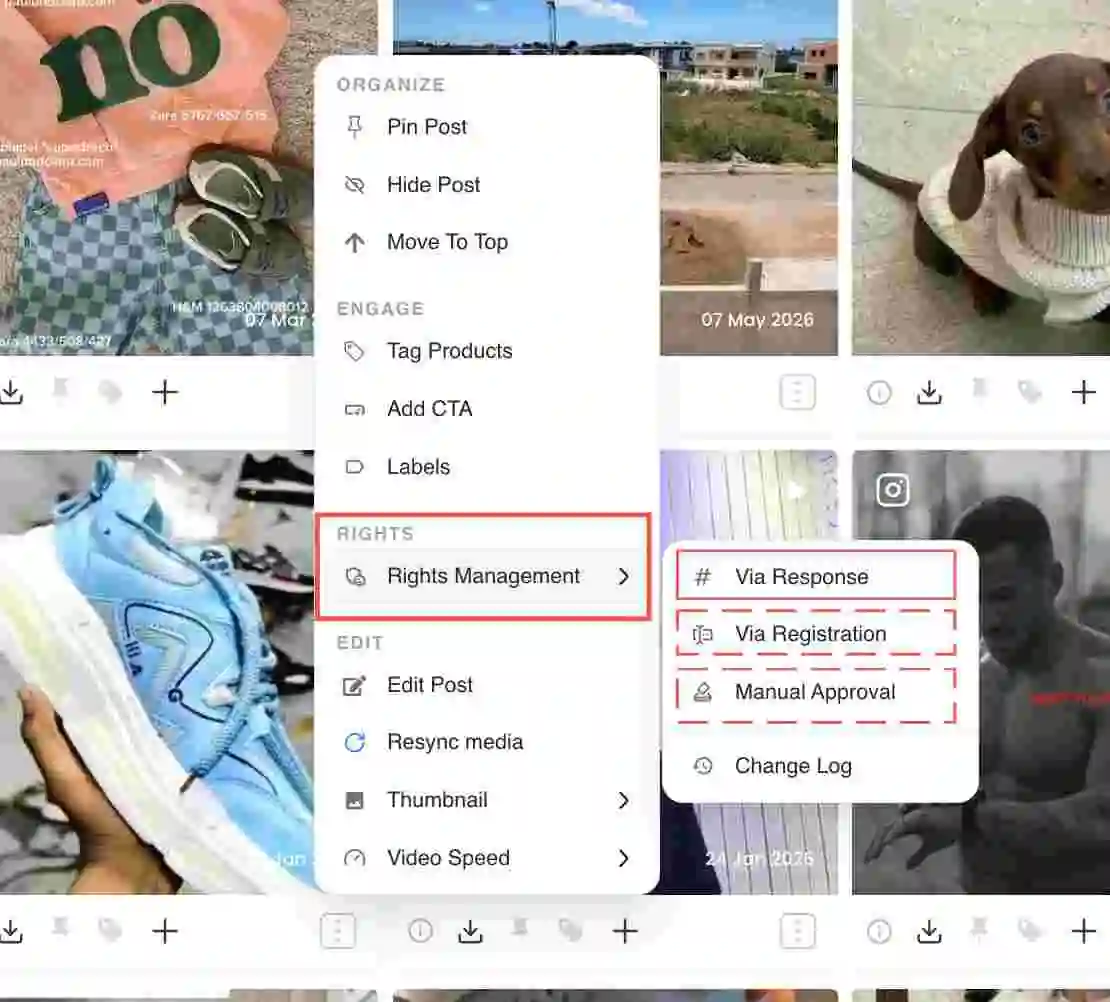
- 2Kliknij menu z trzema kropkami przy poście.
- 3W sekcji Rights otwórz Rights Management.
- 4Wybierz Via Response, Via Registration lub Manual Approval.
Krok 2a: poproś komentarzem (Via Response)
Via Response tak, jak pokazuje go panel
- 01
Edytuj prośbę
Napisz wiadomość. Dodaj nazwę użytkownika twórcy, swój hashtag zgody i link do warunków.
- 02
Podgląd
Sprawdź komentarz. Kliknij Copy albo Post comment na Instagram, jeśli masz połączone konto.
- 03
Wyślij
Otwórz post, wklej komentarz i zaznacz Mark as pending.
- 04
Twórca odpowiada
Odpisuje Twoim hashtagiem. Idukki go wykrywa i oznacza prawa jako zatwierdzone.
Masz połączone konto Instagram w Settings? Idukki może opublikować komentarz za Ciebie pod postami, które o Tobie wspominają. W przeciwnym razie kopiujesz wiadomość i wklejasz ją samodzielnie. Hashtag powinien być krótki i unikalny, np. nazwa Twojej marki plus „Yes”.
Krok 2b: wyślij link do zgody (Via Registration)
- 1Wybierz Via Registration w menu Rights Management.
- 2Skopiuj link albo kliknij Copy Message, żeby dostać gotową wiadomość.
- 3Wyślij go twórcy w DM-ie, e-mailem lub w komentarzu.
- 4Twórca otwiera formularz Content Rights Request. Zgadza się na Twoje warunki i klika Submit & Grant Rights.
- 5Post pojawia się w Twojej kolekcji jako zatwierdzony.
Link jest podpisany dla jednego posta i działa 30 dni. Formularz zapisuje imię i nazwisko twórcy, jego e-mail i odpowiedź. Używaj go przy reklamach i e-mailach, gdy potrzebujesz czegoś więcej niż odpowiedzi w komentarzu.
Via Response
Komentarz i odpowiedź z hashtagiem.
Wins at
- Twórca odpowiada tam, gdzie już jest
- Idukki może opublikować komentarz za Ciebie
Struggles with
- Tylko posty z Instagram i YouTube
- Odpowiedź zawiera mniej szczegółów niż formularz
Via Registration
Formularz zgody pod podpisanym linkiem.
Wins at
- Imię i nazwisko, e-mail i zaznaczona zgoda
- Działa dla każdego posta
Struggles with
- Jeden krok więcej dla twórcy
- Link działa 30 dni
Krok 3: zapisz prawa uzyskane w inny sposób
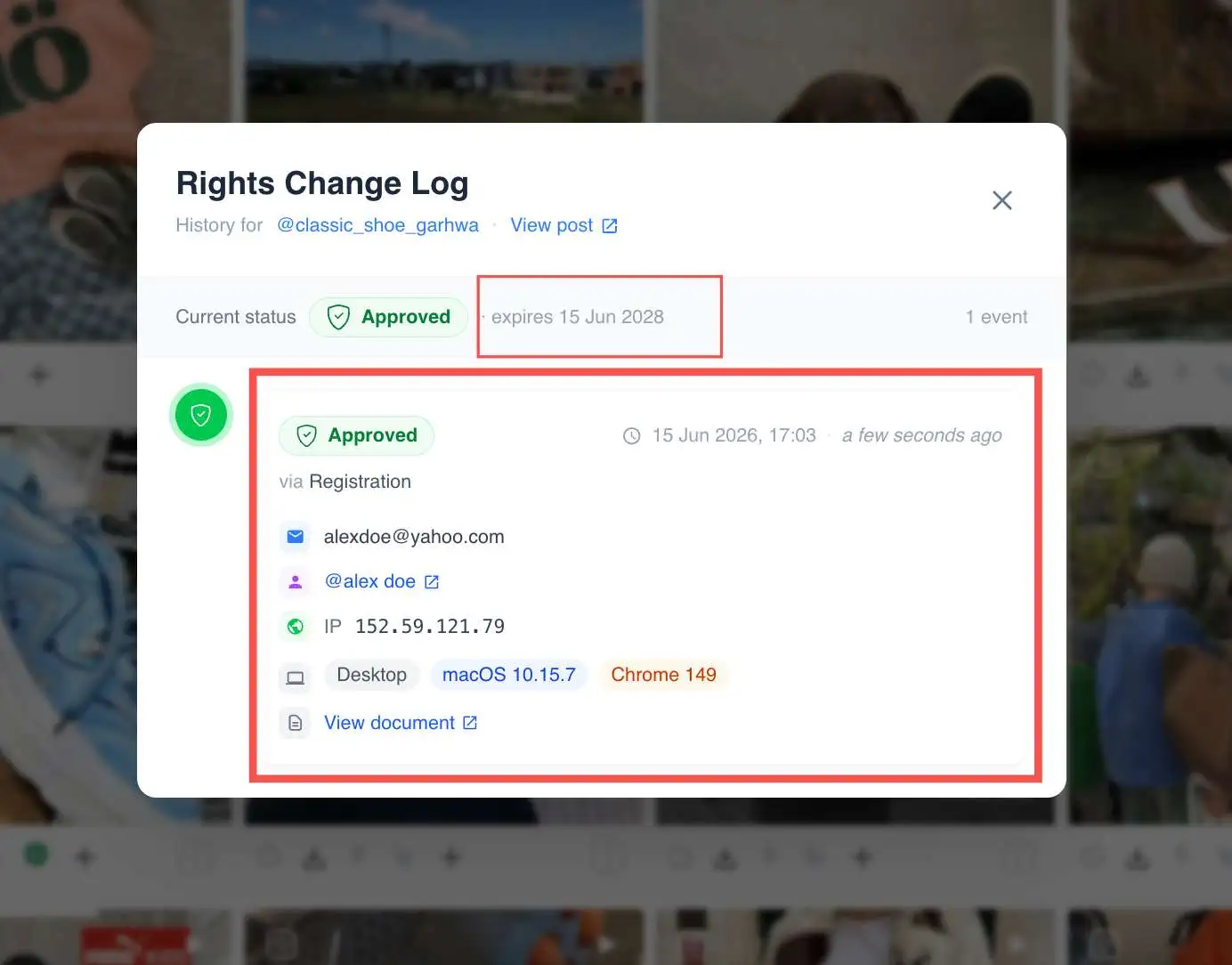
Masz zgodę e-mailem albo treść jest Twoja? Wybierz Manual Approval, by oznaczyć post jako zatwierdzony. To samo menu pokazuje później Revoke Rights, gdyby twórca zmienił zdanie. Otwórz Change Log, by zobaczyć pełną historię.
Pokazuj tylko posty z uzyskanymi prawami
W ustawieniach filtra galerii ustaw Approval Status na Approved Posts. Galeria pokaże wtedy tylko posty z przyznanymi prawami. Wszystkie prośby śledzisz w Settings, potem Rights management.
Wdrażasz to w sklepie? Zobacz Idukki dla Shopify, WordPress lub Wix.
Zautomatyzuj to: twórz listę postów do uzyskania praw w Google Sheets i dostawaj alerty, zanim prawa wygasną.
Pytania, które zadają sprzedawcy
Czy potrzebuję praw do postów z moim hashtagiem?
Tak. Hashtag nie jest licencją. Zapytaj o zgodę, zanim post trafi na stronę produktu, do e-maila lub reklamy.
Skąd Idukki wie, że twórca się zgodził?
Przy komentarzu szuka Twojego hashtagu zgody. Przy linku twórca wysyła formularz zgody.
Jak długo działa link do zgody?
30 dni. Gdy wygaśnie, wyślij nowy.
Czy mogę cofnąć zatwierdzenie?
Tak. Wybierz Revoke Rights w tym samym menu. Change Log to zapisze.
Powiązane
- 1Help: Request usage rights · The help centre version of these steps.
- 2Help: Approve content rights · Manual approval, revoke and the change log.
- 3Rights management in Idukki · What the feature covers.
- 4The UGC rights and permissions guide · What to ask for, and why.
Continue reading
8 pieces in this clusterThese long-form pieces on the Idukki blog link back to this article, go deeper on the cluster.
- Strategy
UGC campaign examples: 90 brand campaigns that ran on customer content
90 real campaigns built on customer posts, grouped by industry. The ask, the reward, the lesson and a full breakdown for each.
- Strategy
Quizlet's TikTok study sets: a UGC campaign breakdown
Quizlet and TikTok let education creators attach study sets to their videos, including sets they made. Viewers go from the lesson to the flashcards in one tap. What a store can copy.
- Strategy
Codecademy's Learner Stories: a UGC campaign breakdown
Codecademy collects learner stories on a form. It publishes them under fixed first-person headings. A reader can compare one path with the next. What a course seller can copy.
- Strategy
MasterClass's Sara Blakely contest: a UGC campaign breakdown
MasterClass asked members who finished one class to pitch an idea. Words first, video for the shortlist. The prize was time with the teacher. What a course seller can copy.
- Strategy
Grammarly's Write the Future with real users: a UGC campaign breakdown
Grammarly made four real users the stars of its 2018 ads. Then it asked followers for their stories. Why the pairing works, and how a store copies it.
- Strategy
Coursera's "tell us your story" video ask: a UGC campaign breakdown
Coursera asked learners for a short video answering four set questions. Each came with a signed waiver. A clean template for any course seller.
- Strategy
Duolingo's Roblox Game Jam: a UGC campaign breakdown
Duolingo gave Roblox developers its mascot, free assets and a spot in its hub. Its agency counts 23 games and 3M visits. How a store copies it.
- Strategy
Oura's Share Your Oura Story form: a UGC campaign breakdown
Oura asks members for their story, their top insight and one tip, with photos or video. The consent terms cover disclosure, payment and account data. A template for any wellness store.
More from Rohin Aggarwal
- Rights and compliance
How to ask Instagram creators for UGC rights at scale without looking like spam
One comment per post, spaced out, in your own words. The creator’s reply is the proof, and silence is a no. The rules we built into our Chrome extension.
- Rights and compliance
Instagram UGC rights requests: two messages, a consent page and the proof to keep
Copy-ready templates for a public comment, a DM and a consent page. Plus what to store as proof and what to do when the answer is no.
- Rights and compliance
Instagram's Partnership Ads API: what it means for UGC rights management
Instagram's Partnership Ads API lets brands run paid media directly from creator handles with 30–40% higher reported engagement. The rights question nobody is asking: who owns this content, and what did the creator actually agree to?