
Come richiedere i diritti UGC ai creator in Idukki
Chiedi il permesso a un creator con un commento o con un link di consenso. I passaggi in Idukki e il registro che resta salvato.

Una cliente ha pubblicato la più bella foto del tuo divano che tu abbia mai visto. Il team ads la vuole lunedì. Nessuno gliel'ha chiesto. Se dice no dopo che l'annuncio è partito, devi toglierlo e chiedere scusa. Chiedere prima richiede due minuti.
In Idukki ogni post ha un menu Rights Management. Chiedi con un commento, con un hashtag di risposta. Oppure invia al creator un link di consenso. In entrambi i casi resta un registro che puoi mostrare in seguito. Ecco i passaggi.
Come si fa in Idukki
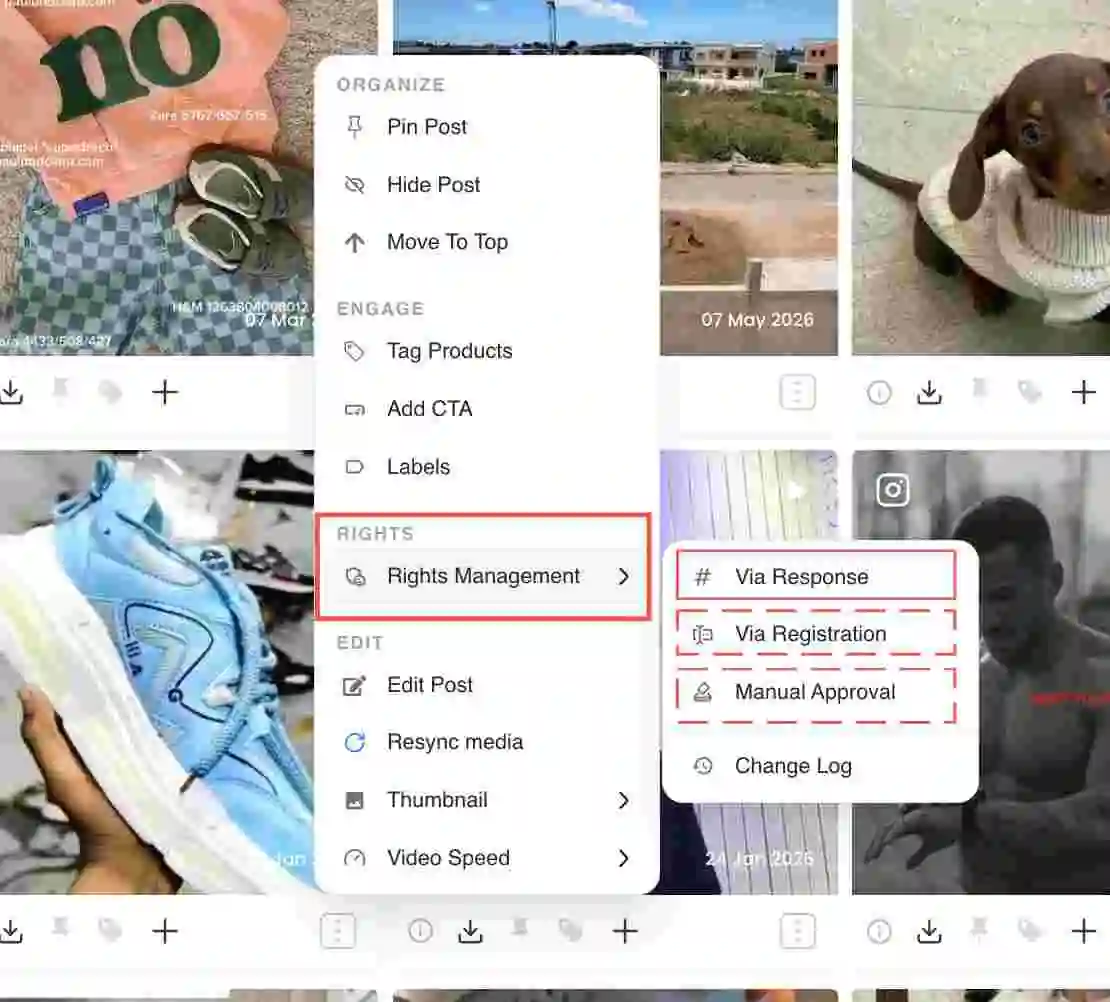
Passo 1: apri Rights Management sul post
- 1In Collections, apri la collezione che contiene il post.
- 2Clicca sul menu con i tre puntini del post.
- 3Sotto Rights, apri Rights Management.
- 4Scegli Via Response, Via Registration o Manual Approval.
Passo 2a: chiedi con un commento (Via Response)
Via Response, come lo mostra la dashboard
- 01
Modifica la richiesta
Scrivi il messaggio. Aggiungi lo username del creator, il tuo hashtag di approvazione e un link ai termini.
- 02
Anteprima
Controlla il commento. Clicca Copy, oppure Post comment su Instagram se l'hai collegato.
- 03
Invia
Apri il post, incolla il commento, poi spunta Mark as pending.
- 04
Il creator risponde
Risponde con il tuo hashtag. Idukki lo cerca e segna i diritti come approvati.
Hai collegato il tuo account Instagram in Settings? Idukki può pubblicare il commento al posto tuo sui post che ti menzionano. Altrimenti copi il messaggio e lo incolli tu. Scegli un hashtag breve e unico, ad esempio il nome del tuo brand più "Yes".
Passo 2b: invia un link di consenso (Via Registration)
- 1Scegli Via Registration nel menu Rights Management.
- 2Copia il link, oppure clicca Copy Message per avere una nota pronta da inviare.
- 3Invialo al creator via DM, email o commento.
- 4Il creator apre un modulo Content Rights Request. Accetta i tuoi termini e clicca Submit & Grant Rights.
- 5Il post risulta approvato nella tua collezione.
Il link è firmato per quel singolo post e dura 30 giorni. Il modulo registra nome, email e risposta del creator. Usalo per ads ed email, dove vuoi qualcosa di più di una risposta in un commento.
Via Response
Un commento e una risposta con hashtag.
Wins at
- Il creator risponde dove si trova già
- Idukki può pubblicare il commento per te
Struggles with
- Solo post di Instagram e YouTube
- Una risposta dà meno dettagli di un modulo
Via Registration
Un modulo di consenso dietro un link firmato.
Wins at
- Nome, email e accordo spuntato
- Funziona con qualsiasi post
Struggles with
- Un passaggio in più per il creator
- Il link dura 30 giorni
Passo 3: registra i diritti ottenuti altrove
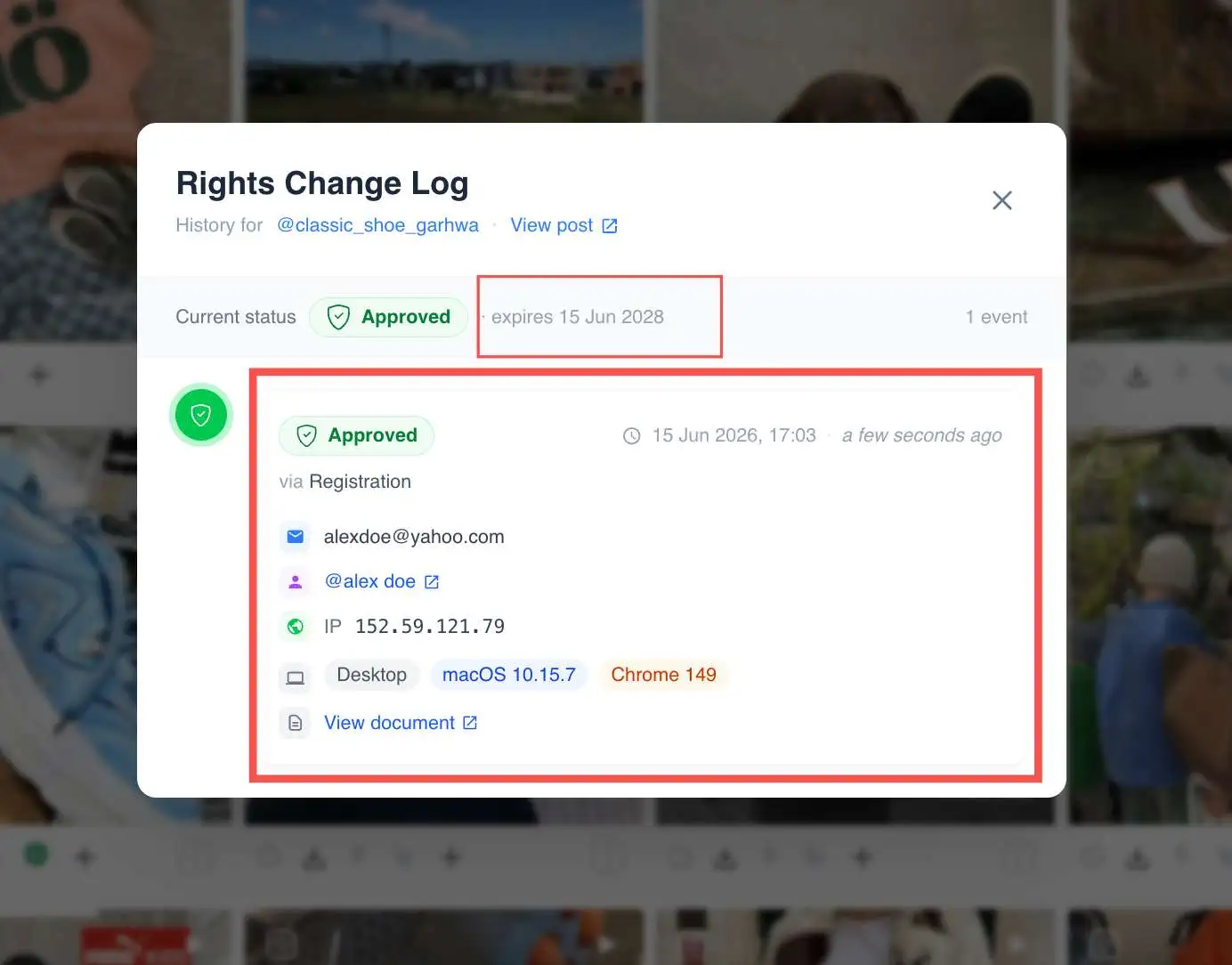
Hai ricevuto un sì via email, o i contenuti sono tuoi? Scegli Manual Approval per segnare il post come approvato. Lo stesso menu mostra poi Revoke Rights, se un creator cambia idea. Apri Change Log per lo storico completo.
Mostra solo i post con diritti ottenuti
Nelle impostazioni dei filtri di una galleria, imposta Approval Status su Approved Posts. La galleria mostra solo i post con diritti concessi. Segui ogni richiesta in Settings, poi Rights management.
Lo configuri su uno store? Guarda Idukki per Shopify, WordPress o Wix.
Automatizza: seleziona i post per i diritti in Google Sheets e ricevi avvisi prima che i diritti scadano.
Le domande dei negozianti
Mi servono i diritti per i post che usano il mio hashtag?
Sì. Un hashtag non è una licenza. Chiedi prima che un post finisca su una pagina prodotto, in un'email o in un annuncio.
Come fa Idukki a sapere che il creator ha detto sì?
Con il commento, cerca il tuo hashtag di approvazione. Con il link, il creator invia il modulo di consenso.
Quanto dura un link di consenso?
30 giorni. Se scade, ne invii uno nuovo.
Posso annullare un'approvazione?
Sì. Scegli Revoke Rights nello stesso menu. Il Change Log lo registra.
Correlati
- 1Help: Request usage rights · The help centre version of these steps.
- 2Help: Approve content rights · Manual approval, revoke and the change log.
- 3Rights management in Idukki · What the feature covers.
- 4The UGC rights and permissions guide · What to ask for, and why.
Continue reading
8 pieces in this clusterThese long-form pieces on the Idukki blog link back to this article, go deeper on the cluster.
- Strategy
UGC campaign examples: 90 brand campaigns that ran on customer content
90 real campaigns built on customer posts, grouped by industry. The ask, the reward, the lesson and a full breakdown for each.
- Strategy
Quizlet's TikTok study sets: a UGC campaign breakdown
Quizlet and TikTok let education creators attach study sets to their videos, including sets they made. Viewers go from the lesson to the flashcards in one tap. What a store can copy.
- Strategy
Codecademy's Learner Stories: a UGC campaign breakdown
Codecademy collects learner stories on a form. It publishes them under fixed first-person headings. A reader can compare one path with the next. What a course seller can copy.
- Strategy
MasterClass's Sara Blakely contest: a UGC campaign breakdown
MasterClass asked members who finished one class to pitch an idea. Words first, video for the shortlist. The prize was time with the teacher. What a course seller can copy.
- Strategy
Grammarly's Write the Future with real users: a UGC campaign breakdown
Grammarly made four real users the stars of its 2018 ads. Then it asked followers for their stories. Why the pairing works, and how a store copies it.
- Strategy
Coursera's "tell us your story" video ask: a UGC campaign breakdown
Coursera asked learners for a short video answering four set questions. Each came with a signed waiver. A clean template for any course seller.
- Strategy
Duolingo's Roblox Game Jam: a UGC campaign breakdown
Duolingo gave Roblox developers its mascot, free assets and a spot in its hub. Its agency counts 23 games and 3M visits. How a store copies it.
- Strategy
Oura's Share Your Oura Story form: a UGC campaign breakdown
Oura asks members for their story, their top insight and one tip, with photos or video. The consent terms cover disclosure, payment and account data. A template for any wellness store.
More from Rohin Aggarwal
- Rights and compliance
How to ask Instagram creators for UGC rights at scale without looking like spam
One comment per post, spaced out, in your own words. The creator’s reply is the proof, and silence is a no. The rules we built into our Chrome extension.
- Rights and compliance
Instagram UGC rights requests: two messages, a consent page and the proof to keep
Copy-ready templates for a public comment, a DM and a consent page. Plus what to store as proof and what to do when the answer is no.
- Rights and compliance
Instagram's Partnership Ads API: what it means for UGC rights management
Instagram's Partnership Ads API lets brands run paid media directly from creator handles with 30–40% higher reported engagement. The rights question nobody is asking: who owns this content, and what did the creator actually agree to?